
The Lernix AI web app is live at app.lernixai.com. You get the same study flow as iPhone and iPad: add a PDF, YouTube link, lecture, image, or text, then receive notes, flashcards, quizzes, mind maps, and a Visual Note.
Typical PDF and YouTube analysis finishes in 8-10 seconds. Web subscriptions cost less than iOS. You can start in the browser today.
What is the Lernix AI web app?
The Lernix AI web app is the browser version of Lernix, an AI study app that turns your own materials into a review pack. It is built to match the iOS experience: same inputs, same outputs, same library. You study on a laptop when that is the machine in front of you, without waiting for a separate desktop product.
How to start on the web
- Open the web app: Go to app.lernixai.com.
- Sign in: Use the account options on the page.
- Add material: Upload a PDF, paste a YouTube link, add an image, or paste text.
- Wait 8-10 seconds: PDF and YouTube analysis usually finishes in that window.
- Study the pack: Open Smart Notes, the Visual Note, flashcards, quizzes, a mind map, and chat with your notes.
New accounts can start free. See pricing for how free use and Premium work. Exact amounts vary by region and billing platform, so we do not list dollar prices here.
What you can do in the web app
PDF to notes and flashcards
Upload a textbook chapter, lecture export, or paper. Lernix builds structured notes and practice from that file. For the document workflow, see PDF to flashcards.
YouTube to a study pack
Paste a lecture or tutorial link. You get notes and practice without scrubbing a long video by hand. See YouTube to study materials.
Visual Notes for memory and slides
After Smart Notes, Lernix draws a 16:9 Visual Note: 3-6 core points, short explanations, and diagrams where they help. Save it, pin it, or drop it into a slide deck as a figure. This is not a screenshot of paragraphs. It is a one-page infographic locked to your source.
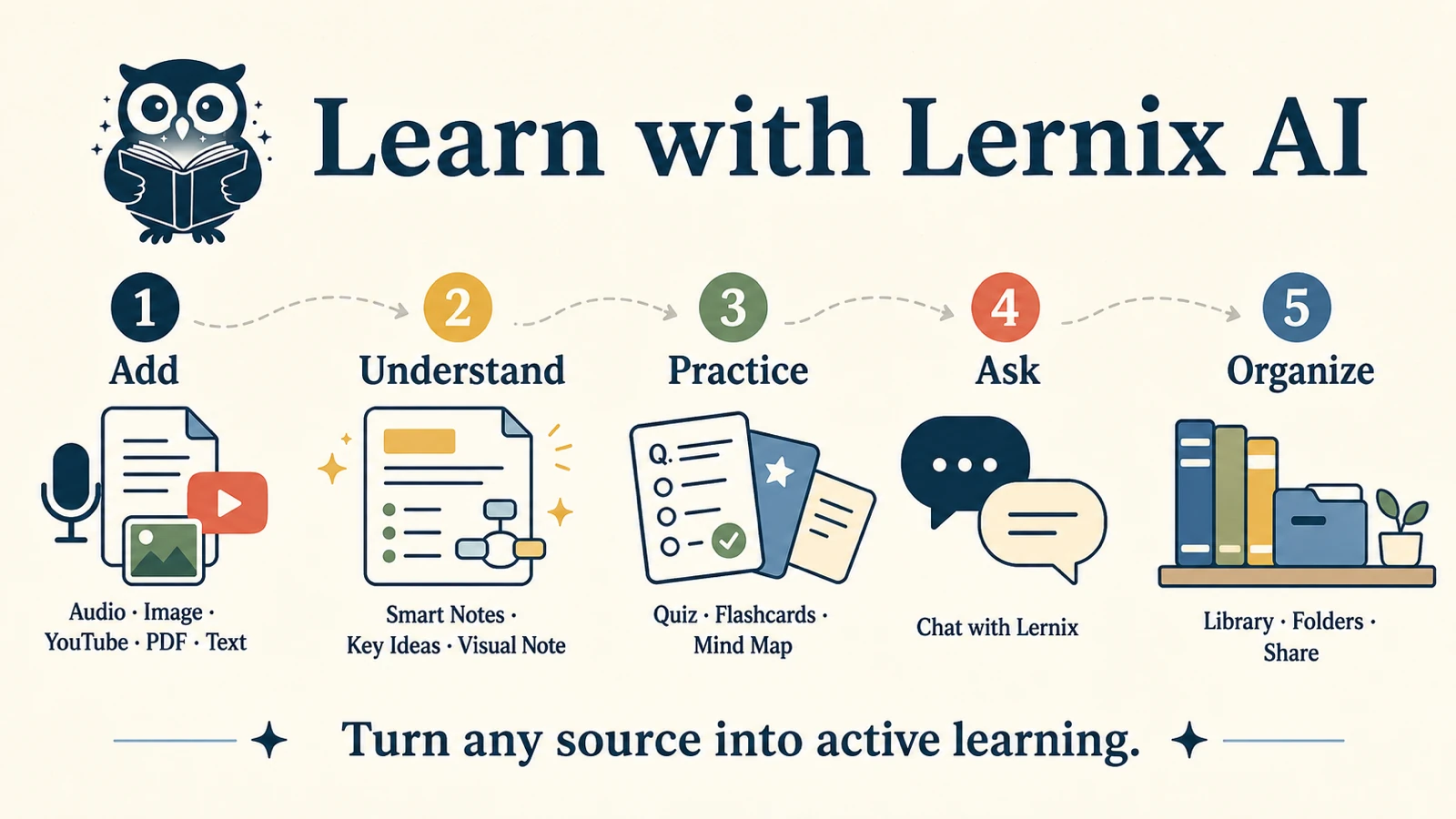
The image above is a Visual Note. Your own PDF or YouTube video produces the same format. More detail: Visual Notes and turn study material into a Visual Note.
Flashcards, quizzes, and mind maps
The rest of the pack is built for recall: flashcards, quizzes, and a mind map of the same material.
Chat with your notes
Ask questions grounded in the notes you already generated, not a generic chatbot with no source.
PDF and YouTube analysis in 8-10 seconds
PDF and YouTube analysis on Lernix typically finishes in 8-10 seconds. That is the window we design the web and iOS products around: paste a link or drop a file, stay on the page, start reviewing.
Speed matters because a slow analysis kills a short study block. If you have twelve minutes between classes, a two-minute wait is most of the session.
Treat generated notes as a draft. Check names, numbers, formulas, and diagrams against the original. Do not upload files you are not allowed to share.
Web vs iOS: same study flow, lower web price
| Web app | iOS app | |
|---|---|---|
| Study flow | Same: materials in, study pack out | Same: materials in, study pack out |
| PDF and YouTube | Typical analysis in 8-10 seconds | Same speed target |
| Visual Notes | 16:9 infographic for review or slides | Same, plus save to Photos |
| Devices | Browser on laptop or desktop | iPhone and iPad (iOS / iPadOS 16.4+) |
| Price | Lower than iOS | App Store pricing |
| Billing | Paid in the browser | App Store |
Bottom line: pick the web app if you study at a computer and want the lower price. Keep iOS if you capture lectures and review on the phone. Android is live on Google Play.
Web and iOS subscriptions are billed on different stores. A web subscription is not an App Store purchase, and the reverse is also true. Check pricing for how plans work.
Frequently Asked Questions
Is the Lernix AI web app live?
Yes. The Lernix AI web app is live at app.lernixai.com. It is not a waitlist product. You can sign in and analyze a PDF or YouTube video today.
Is the web experience the same as iOS?
The web app is built to match the iOS study flow: same inputs, same study pack, same Visual Notes. Layout follows a large screen. Lecture capture with the phone camera stays on iOS.
How fast is PDF and YouTube analysis?
Typical PDF and YouTube analysis finishes in 8-10 seconds. Time can vary with file size, video length, and network conditions. Treat that range as the usual case, not a guaranteed stopwatch.
What is a Visual Note?
A Visual Note is a 16:9 study infographic with 3-6 points from your material. You can use it for a fast review, as a memory cue, or as a figure in slides. It does not invent facts outside the source.
Is the web version cheaper than iOS?
Yes. Web subscriptions are priced below the iOS App Store plans. Open the web app to see the current price for your region. We do not list dollar amounts here because they vary by country.
Can I start without paying?
New accounts can start free. Premium unlocks unlimited study tools. See pricing.
Try the web app now
Open app.lernixai.com, add a PDF or a YouTube link, and wait about 8-10 seconds. If the Visual Note is useful, save it or drop it into your slides. That is the product: the same Lernix study flow as iOS, now in the browser, at a lower price.
Need iPhone instead? Get Lernix AI on the App Store.